Follow this guide to find out how you can edit names and details as well as deactivate or reactivate someone.
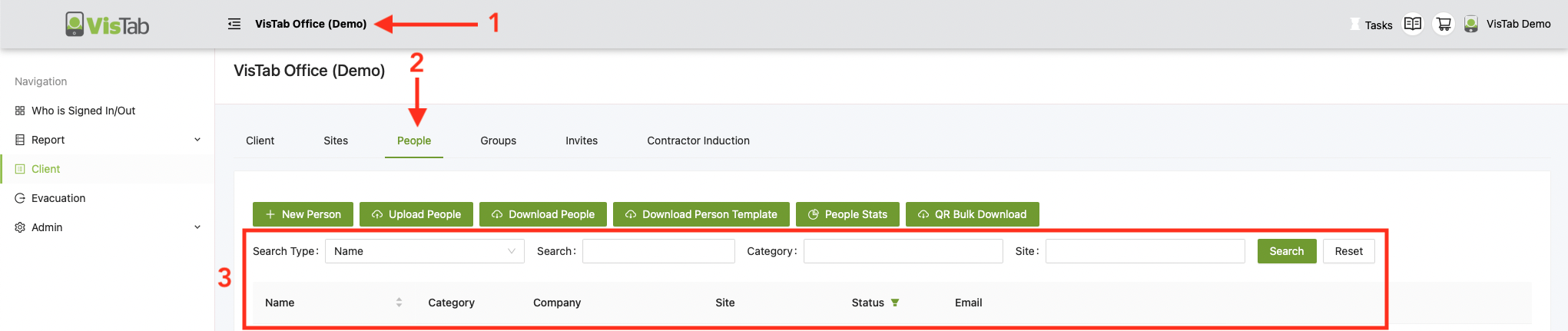
- Select your Organisations Name at the top
- Select People
- Use the tools provided to filter the results or look for a specific person
Refer to Search & Filter People on how to refine your results.
Edit
- Select the name of the Person you are wanting to edit
- Make your changes and select Update

Delete
There is currently no option to delete a person due to people being referenced in Reports. However, you can deactivate people so they won't show up on your system anymore.

Reactivate
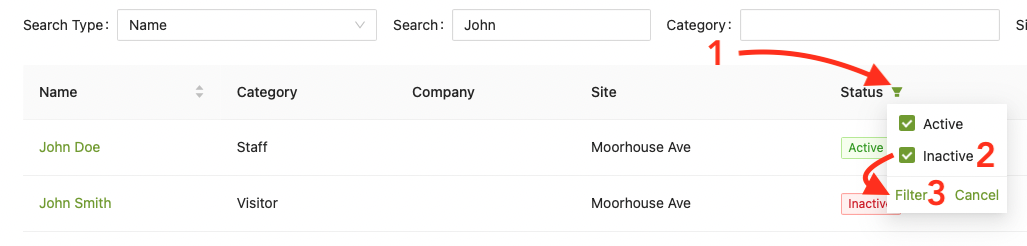
If you can't immediately find someone you are looking for, they might have been deactivated, use the funnel to look for Inactive entries and set them active.
- Select the Funnel
- Tick Inactive
- Select Filter